Follow up your prospects
Find the people who came for a trial or a drop-in, see who to call and record who joined.
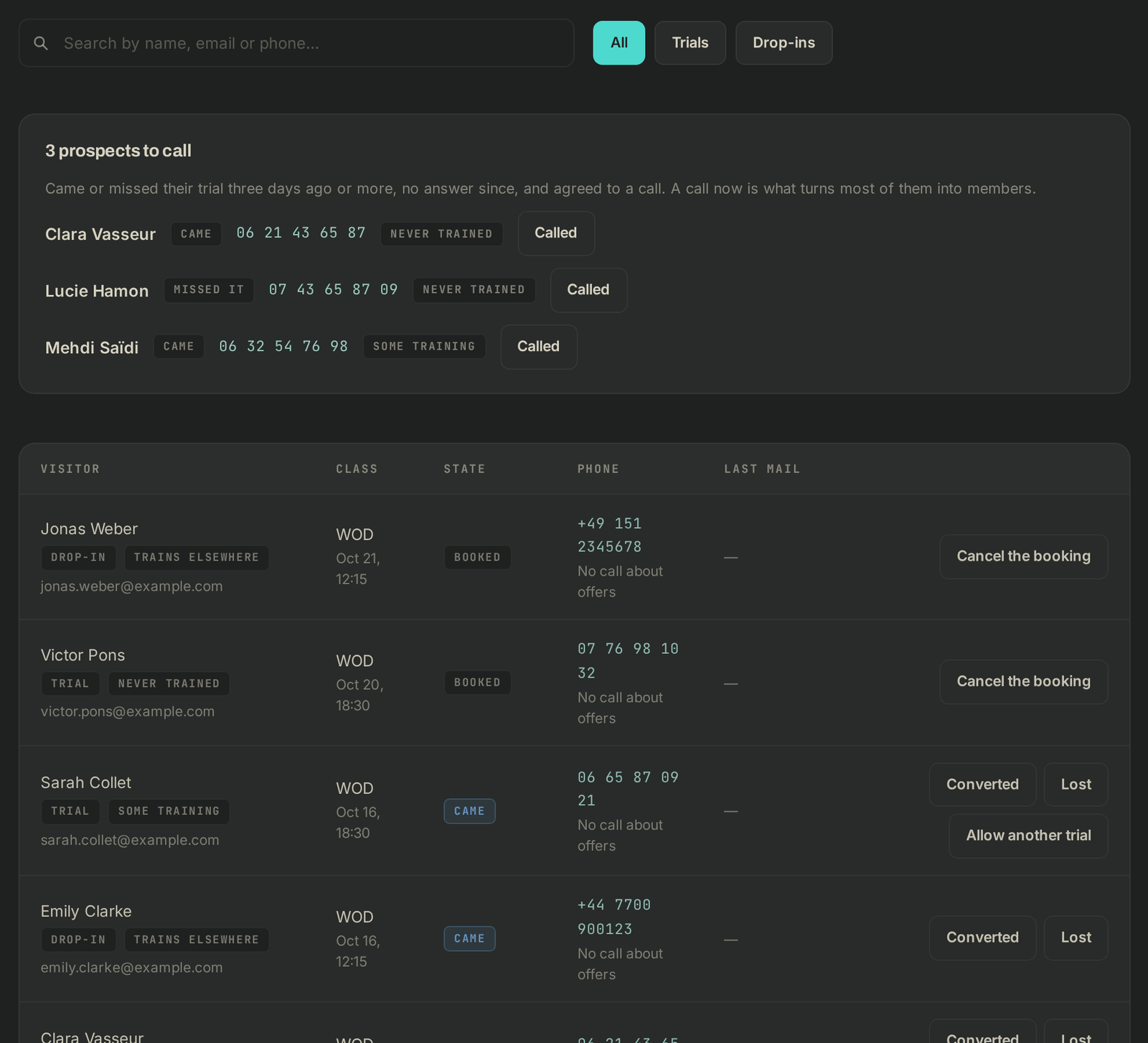
People who came for a trial or a drop-in aren't in your member list: they're under Prospects in the menu. It lists the trials and drop-ins of the last 90 days, newest first.
Find someone
- The All, Trials and Drop-ins buttons filter the list.
- Search by name, email or phone… searches all three, ignoring accents and capitals.
- Each row shows the Visitor (with Trial or Drop-in, their experience, and Comeback if they were a member over a year ago), the Class, the State, the Phone and the Last mail they got. Click a row to open the class.
States
- To confirm: they haven't clicked the confirmation email yet. They don't count anywhere.
- Booked: the class hasn't happened yet.
- Came or Missed it: what the coach marked.
- Not marked: the class is over and nobody took attendance. Do it so the right emails go out (see Take attendance).
- Converted: you said so, or they (or an account with the same phone number) took a membership or a pack within 60 days of their trial.
- Lost: you said so.
Who to call
The "N prospects to call" block at the top lists the people worth a call right now. Someone shows up there when:
- they came or missed it 3 or more days ago, and are neither converted nor lost;
- they agreed to a call less than 12 months ago and left a number;
- they haven't rated their class;
- you haven't called them in the last 7 days.
Their number is next to their name (on a phone, tap it to call). After the call, click Called: they leave the block for 7 days, and come back if they still haven't answered. Without consent to a call, the Phone column says No call about offers.
Record what happened
In the right-hand column of a row:
- Converted: they joined. They get no more reminders.
- Lost: they won't be back. The reminders stop.
- Allow another trial (trials only): they can book a new trial from your link.
- Link to …'s membership: shows when a new member has the same name under another email address. Click it to count the trial as converted.
Undo takes back Converted or Lost.
Before the class, the only option is Cancel the booking: the visitor is told by email, and a drop-in paid online is refunded in full.
On the dashboard
When trials or drop-ins are on, the Trials · 30 days card on the Dashboard sums up the month: visitors to your trial page, trials booked, how many came (with the show rate), how many converted, the average rating, and Conversion (members among those who came to their trial). Its link goes to Prospects, with the number of prospects to call.

If it goes wrong
- "No trial or drop-in yet.": turn your links on in Settings → Booking rules, then put them on your website (see Offer free trials and drop-ins).
- A row has no buttons: you need permission to edit members, or to manage bookings to cancel one.
- "Booking cancelled, but the refund failed. Refund it from your Stripe dashboard.": make the refund in Stripe.
- Anything else: write to Wodloop support, support@wodloop.com.